Track frontend errors with @nais/apm 
@nais/apm is a drop-in browser telemetry SDK for Nais apps. It wraps
Grafana Faro with an ergonomic developer
experience — zero-config init, captureException/captureMessage, mandatory
PII scrubbing — and ships everything to your team's own Grafana stack. By the
end of this tutorial your app's errors show up as issues in Nais APM.
Status: pre-release
@nais/apm is at 0.1.0 and pre-1.0. The API may change in minor releases
— pin an exact version and read the
CHANGELOG before
upgrading.
Prerequisites 
- A browser (frontend) application deployed on Nais.
- A GitHub Personal Access Token with the
read:packagesscope.@nais/apmis published to the GitHub Package Registry, which requires an authenticated request to resolve any package under thenaisscope — even public ones. This is a one-time setup per machine or CI job.
1. Configure the package registry 
Add these two lines to your project's .npmrc (create the file if it doesn't
exist):
@nais:registry=https://npm.pkg.github.com
//npm.pkg.github.com/:_authToken=${GITHUB_PACKAGES_TOKEN}
Export your token in the shell — or add it as a CI secret — as
GITHUB_PACKAGES_TOKEN:
export GITHUB_PACKAGES_TOKEN=ghp_xxxxxxxxxxxxxxxxxxxxxxxxxxxxxxxxxxxxWhy the token
This friction is a GitHub Package Registry limitation, not a @nais/apm
design choice. A future move to npmjs.org would remove it.
2. Install 
Pin an exact version — @nais/apm is pre-1.0, so the API can change in minor
releases (see the pre-release note above):
npm install @nais/apm@0.4.0
# or: pnpm add @nais/apm@0.4.0 / yarn add @nais/apm@0.4.0
3. Initialize (zero config) 
Call init() once, as early as possible in your app's entry point:
// main.tsx
import { init } from '@nais/apm';

init(); // app name, version, environment and collector URL resolved from nais
That's the whole story on Nais. init() resolves your app name, version,
environment, and the telemetry collector URL automatically — from Nais
meta tags in your
served HTML, or from build-time NAIS_* environment variables. You can override
any of them explicitly if you need to.
On localhost, where no collector URL resolves, init() sends nothing over
the network and echoes every signal to the browser console instead — so you can
see exactly what would have been sent.
4. Capture exceptions 
Uncaught errors and unhandled promise rejections are captured automatically once
init() has run. For handled errors, capture them explicitly:
import { captureException, captureMessage } from '@nais/apm';

try {
  await save(form);
} catch (e) {
  captureException(e, { context: { form: 'checkout-step-2' } });
}

captureMessage('fallback flow used', 'warning');
See the API reference for setUser,
setContext, and the other exports.
5. Ship readable stack traces 
Production stack traces point at minified JavaScript. The Nais telemetry
collector maps them back to your source using sourcemaps — server-side, with no
extra SDK configuration. You just need to deploy your .map files alongside your
bundle on the CDN.
Follow Sourcemap deobfuscation for the build settings and CDN requirements.
6. See your errors as issues 
Deploy your app, then trigger an error. Open your service in Nais APM and go to the Issues tab. Your exception appears as an issue, grouped with other occurrences of the same error, with its stack trace and impact. Filter the source to Browser to isolate frontend issues.
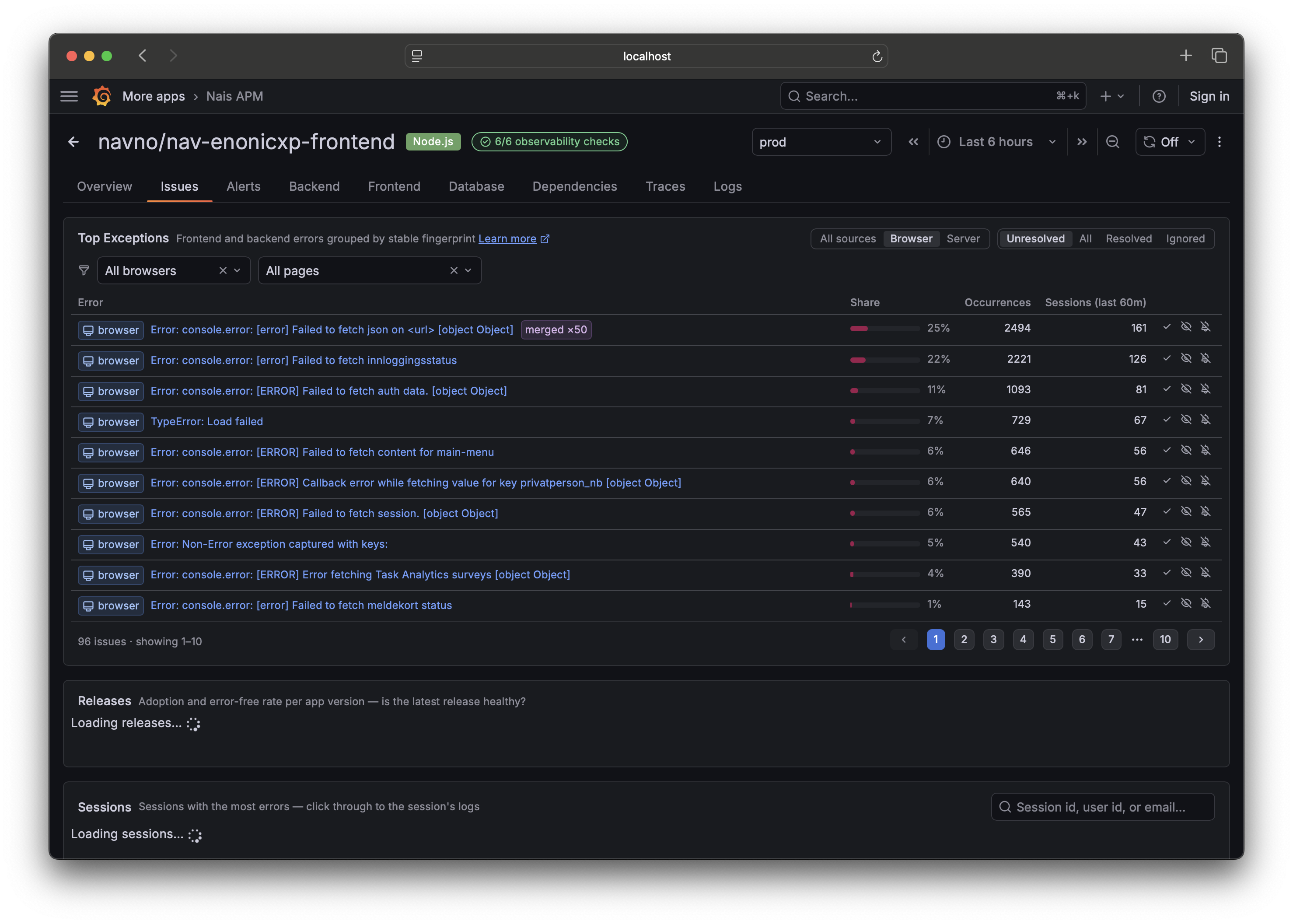
From there you can triage it or create an alert so you hear about the next spike.
Next steps 
- Enable session replay to see what the user saw around an error (opt-in, preview).
- Read the full
@nais/apmAPI reference.